Claude CodeAgentic prototypingAI research synthesisAI-ready design system
The mandate
Our CEO used Claude Code himself and saw what AI could do for a team our size. So he made it a company-wide push: use AI to get more done and get to production faster. It was up to the product team to find the right tool.
I started learning the tools early: Cursor, Claude Code, AI plugins in VS Code, and Magic Patterns. I wanted to know what each one was good at before we built our process around one.
The PMs and developers looked for a tool the whole platform could use with our design system. We explored a few, including Lovable, and the team started prototyping in Magic Patterns.
What I noticed
It went well at first. Soon, though, I saw three problems with Magic Patterns:
- The prototypes drifted. They weren’t following our design system. Components, spacing, and patterns were close but not the same as ours, so developers had to find and close those gaps before anything shipped. The faster prototypes were slowing down development.
- Setup would be costly. Getting our design system into Magic Patterns was going to take a lot of effort and money.
- We’d be locked in. Once our component library lived there, every prototype would depend on a second copy of our components, kept apart from the code. That copy would need its own upkeep, and the technical debt would grow with every prototype.
As I learned the tools, I saw that much of what Magic Patterns did, Claude Code could do directly. Magic Patterns added a friendlier interface on top. That gave me the idea: use Claude Code ourselves, in a sandbox built from our actual Storybook components. There would be nothing to upload, no second library to maintain, and every prototype would start from our design system.
Instead of moving our components into Magic Patterns, I proposed prototyping in Claude Code directly, on our own Storybook components.
The plan
I wrote a plan for bringing AI into how we designed, in a way that met the mandate and kept prototypes in line with production. I led it with the designer I managed. It had two parts:
- Close the gaps first. Find every place where production and Figma differed from the patterns already built in Storybook, and fix them, so the AI had one correct set of components to build with.
- Give PMs a place to build with guardrails. A separate sandbox where PMs could prototype quickly, using only those components.
Getting the design system ready
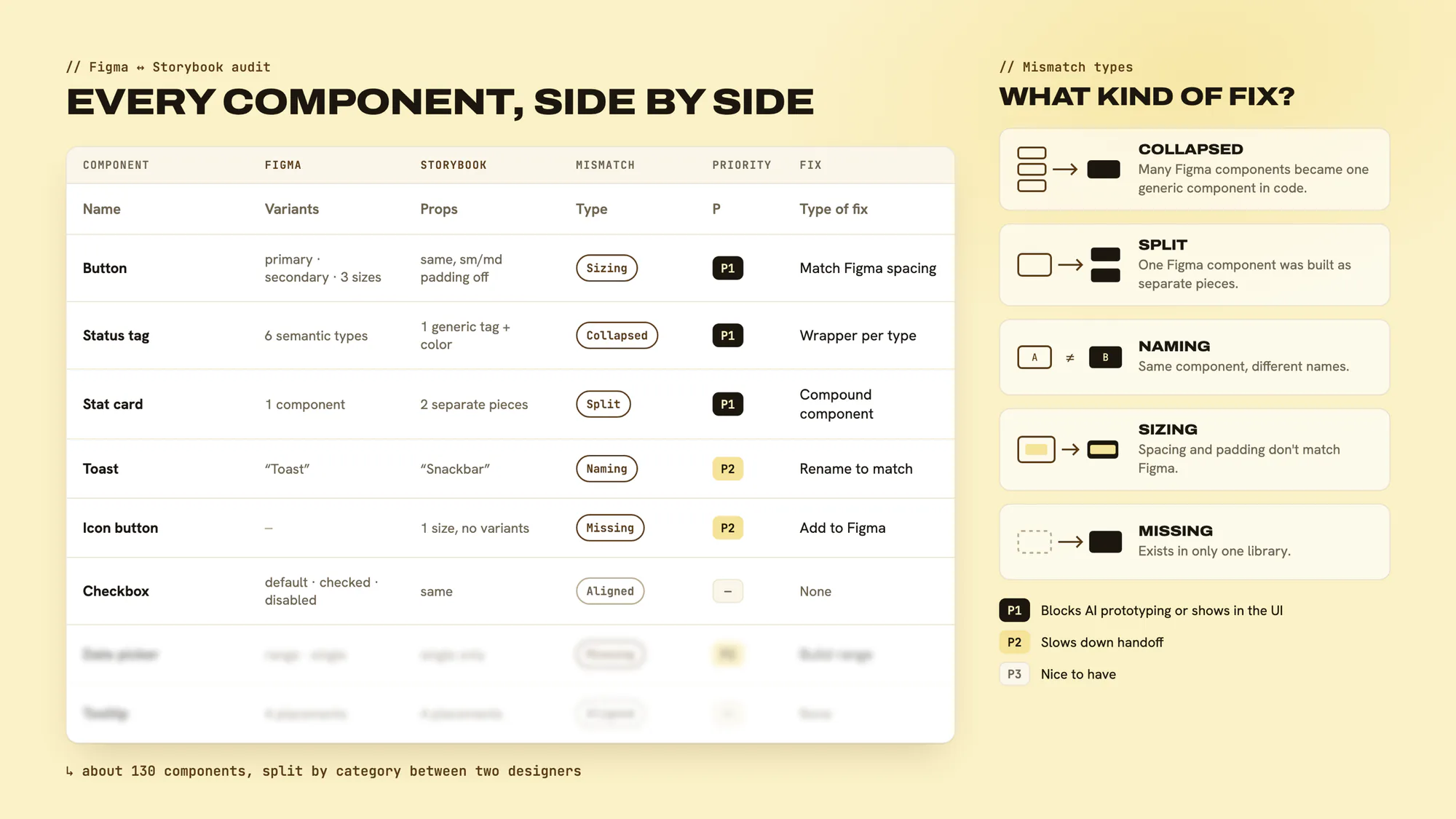
For Claude to use the right components and stay within our guidelines, our component library in Storybook had to match our Figma library one-to-one, and it didn’t yet. Most components only partly matched. Some had different names in Figma and code, some had sizes and padding that were off, and some existed on only one side.
I created and led an audit comparing the two libraries component by component, about 130 components in all. Each mismatch got a type, so we knew what kind of fix it needed:
- Collapsed: several Figma components had become one generic component in code. For example, all our status badge types were a single badge in Storybook.
- Split: one Figma component had been built as separate pieces in code.
- Naming: the same component had one name in Figma and another in Storybook.
- Sizing: spacing and padding didn’t match Figma.
- Missing: a component or variant existed in only one library.
I prioritized by impact: first anything that broke the AI prototyping workflow or caused visible UI problems, then mismatches that slowed down handoff, then nice-to-haves. The designer I managed and I split the categories, and we worked with engineering on the fixes.
The PM sandbox
The sandbox lived inside our production monorepo in GitHub, on its own branch. On that branch we removed the back end, so nothing could reach live APIs or even the test APIs. Pages ran on mock data. Everything else matched production one-to-one: the same pages, the same components, the same layout.
Standing it up came down to three tools:
- GitHub held the sandbox branch, next to the code developers shipped from.
- VS Code was where PMs and designers opened the branch and worked.
- Claude Code ran inside VS Code and built the prototypes from our Storybook components.
Because the sandbox only had our components, what PMs built looked like Monument.
I brought in an AI-design consultant to stand up the branch. I defined what the sandbox needed and its guardrails, led the audit that made it work, and ran it day to day with the designer I managed, keeping the branch in line with production. I partnered with the product director on the rollout, and the consultant led most of the PM training while I advised on the design side.
I set it up this way because I expected prototypes in code to become part of how we built, not only how we explored ideas. Starting from production meant a prototype could go to developers as code.
The tradeoff. Removing the back end kept the sandbox safe, but it made handoff harder. The prototypes looked like the product, but nothing in them was connected to our APIs. Developers still had to wire each page to the back end, so the handoff wasn’t as clean as the prototypes looked.
I’d still set it up this way. AI coding tools have gotten better since then, and developers can now take a front end built in a production clone and connect it to the APIs themselves, often with AI. The sandbox already gives them the right pages and components, so the part left for them is the data.
Working with PMs
PMs could now turn an idea into a working prototype themselves. They still did research as usual, with customers and the field, and then prototyped what customers were asking for. From there, we worked in one of two ways.
Simple features. The PM’s prototype was close. I cleaned it up: made sure it followed our standards and used the right components, and improved the layout and the flow.
Complex features. The PM’s prototype was a starting point, and the work changed a lot from there. Design and product had many conversations, and we showed iterations to customers to get their feedback. Design worked with customers directly at this stage, so we tested with users properly and asked the right questions.
The approval queue for rent increases and the leads Kanban board both started this way. You can see them in More from Monument.
Prototyping whole flows
On my later Monument work (collecting payment, multi-unit payments, receipts, and account statements), I prototyped each flow end to end in the sandbox. That let me check that the data lined up across pages. When a tenant pays off a unit from the tenant page, for example, that unit has to update everywhere else it shows up. Those flows are in One Tenant, Six Units.
Handoff changed too. Prototypes were code, so we merged them into the sandbox branch in GitHub, and developers reviewed it and built it in the product.
Synthesizing research
For the leads research, I used AI to analyze my interview transcripts and pull out findings and insights. I don’t take its word for it. I check every finding against my notes and my own read of the interviews, and fix or cut anything that doesn’t match.
A skill for design capacity
I built a Claude skill that pulled our Jira tickets and showed how much capacity the designer I managed and I had for the sprint, based on our availability that week. It produced a report I could share with the product director.
What changed
Before the sandbox, a feature took two to three sprints for the whole cycle: research, design, development, and release to production. With the sandbox, many features went through that whole cycle in one to two weeks.
Many features went from two to three sprints to one to two weeks, from research to production.
After the sandbox launched, PMs started building out more of the pages there, and running their user research on those prototypes. The pages looked like production because they were built from it. We mostly stopped working in Figma.
The guardrails
When a feature goes from research to production in one to two weeks, details are easy to skip: empty and error states, loading, edge cases, and copy. These are the guardrails I put in place so the speed didn’t cost us quality:
- One set of components. The sandbox only had our Storybook components, so prototypes stayed within the design system.
- No live data. With the back end removed, nothing built in the sandbox could reach customer data or live APIs.
- Design on every feature. Simple features got a cleanup pass from design. Complex ones got iterations with design and customers.
- Testing before building. Complex features went in front of customers before they went to developers.
I’d keep all four, and add one more: a check for empty, error, and loading states before handoff, since a sandbox with mock data doesn’t show them on its own.